

You train a sentiment analysis model with 94% accuracy. It works perfectly in your notebook. You deploy it to production, and suddenly it fails—different accuracy, missing dependencies, or worse, you can't reproduce the exact training setup when debugging.
This happens because ML version control is fundamentally different from code version control. Git tracks code, but your model depends on:
- The exact dataset version used for training
- Hyperparameters and training configs
- Environment dependencies (library versions, Python version, CUDA)
- The trained weights themselves
This article shows you how to combine W&B for experiment tracking with KitOps for packaging everything into reproducible, deployable ModelKits. We'll train a sentiment analysis model and deploy it to Jozu Hub with full lineage tracking.
What you'll build:
- Train and track a scikit-learn model with W&B
- Package it as a versioned ModelKit with KitOps
- Deploy to Jozu Hub with full audit trails and security scanning
In this article:
- Experiment tracking with W&B
- Packaging with KitOps
- Tutorial: Build and deploy a sentiment model
- Production considerations
In software development, Git allows engineers to manage and version code as they build. Machine learning needs the same capability, but Git alone doesn't cut it. You need to version not just code, but models, datasets, hyperparameters, and dependencies.
To properly version ML workflows, you need to answer:
- How do you track what data, code, and hyperparameters produced a model?
- How do you ensure reproducibility across different environments?
- How do you manage deployment-ready artifacts with audit trails?
W&B and KitOps solve these problems by handling different phases of the ML lifecycle: experimentation and production deployment.
Experiment Tracking with Weights & Biases
When training models, you'll run dozens of experiments—different architectures, hyperparameters, data augmentations. Without tracking, you'll lose track of which changes improved performance and why.
A common scenario: your teammate asks you to reproduce a model from two weeks ago. Can you remember the exact dataset split, optimizer settings, and library versions? Probably not.
W&B solves this by creating a permanent record of every training run:
- Hyperparameters and config
- Metrics over time (accuracy, loss, etc.)
- System resources (GPU usage, training time)
- Code version and environment snapshot
W&B logs everything automatically as you train, making every experiment searchable and comparable.
Packaging Models for Production with KitOps
Experiment tracking gets you to a good model. Production requires guarantees that the exact model, dataset, and code you deploy are trustworthy, reproducible, and secure.
When teammates ask, "Which dataset version trained this model?" or "How do we know this artifact hasn't been tampered with?" you need answers.
KitOps packages your model, dataset, code, and documentation into ModelKits—self-contained artifacts that include everything needed to reproduce or deploy a model.
A ModelKit contains:
- Trained model weights
- Dataset version used for training
- Training code and dependencies
- Metadata from your experiment tracking
KitOps gives you:
- Reproducibility - Bundle model, code, and dependencies together
- Portability - OCI-compliant artifacts run anywhere (cloud, edge, on-premises)
- Security - SBOM generation and vulnerability scanning before deployment
- Reusability - Pull pre-trained models from Hugging Face or your registry, package them, and share across teams
The Complete MLOps Workflow
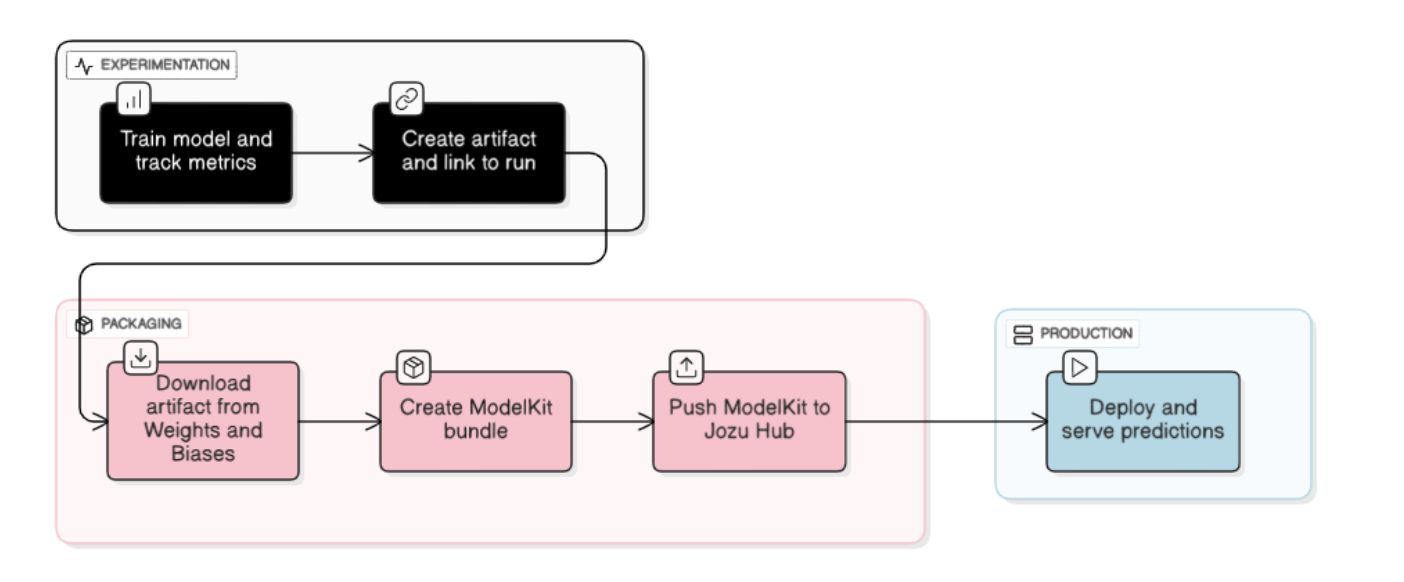
W&B handles experimentation—tracking runs, datasets, and metrics as you iterate toward better models.
KitOps handles production—ensuring your trained models are versioned, secure, and ready to deploy.
The combination gives you end-to-end lineage. When a production model fails, you can trace back to the exact experiment run, dataset version, and training environment.
KitOps includes SBOM generation (Software Bill of Materials)—a complete manifest of everything in your ML system: model weights, datasets, libraries, and dependencies. Once a model leaves the notebook, the focus shifts from "does it work?" to "what exactly is it built on?" SBOMs document every component in your stack.
Technical Deep Dive: Using KitOps with Weights & Biases
We'll train a sentiment analysis model using scikit-learn, track it with W&B, package it as a ModelKit with KitOps, and deploy to Jozu Hub.
Prerequisites
Accounts:
- Weights & Biases - Get your API key after signup and save it securely
- Jozu Hub - For managing and deploying ModelKits
Install dependencies:
pip install wandb scikit-learn joblib matplotlib python-dotenv kitopsStep 1: Track Training with W&B
Without tracking, you can't debug production failures. W&B records everything needed to reproduce a model.
import numpy as np
import matplotlib.pyplot as plt
from sklearn.datasets import fetch_20newsgroups
from sklearn.feature_extraction.text import TfidfVectorizer
from sklearn.linear_model import LogisticRegression
from sklearn.metrics import accuracy_score, precision_score, recall_score, f1_score, confusion_matrix
from sklearn.model_selection import train_test_split
import joblib
import wandb
import os

# Initialize tracking - logs hyperparameters, metrics, and environment
wandb.login()
run = wandb.init(
    project="nlp-sentiment-sklearn",
    name="logistic-regression-v1",
    config={
        "model": "LogisticRegression",
        "max_features": 5000,
        "C": 1.0,
        "solver": "lbfgs",
        "max_iter": 1000,
        "test_size": 0.2,
        "random_state": 42
    }
)

config = wandb.config

# Load dataset - using 20 newsgroups for binary text classification
categories = ['alt.atheism', 'soc.religion.christian']
newsgroups_train = fetch_20newsgroups(subset='train', categories=categories, shuffle=True, random_state=42)
newsgroups_test = fetch_20newsgroups(subset='test', categories=categories, shuffle=True, random_state=42)

X_train, y_train = newsgroups_train.data, newsgroups_train.target
X_test, y_test = newsgroups_test.data, newsgroups_test.target

# Create validation split
X_train, X_val, y_train, y_val = train_test_split(
    X_train, y_train, test_size=0.2, random_state=config.random_state
)

# Feature extraction with TF-IDF
vectorizer = TfidfVectorizer(max_features=config.max_features, stop_words='english')
X_train_tfidf = vectorizer.fit_transform(X_train)
X_val_tfidf = vectorizer.transform(X_val)
X_test_tfidf = vectorizer.transform(X_test)

# Train model
model = LogisticRegression(
    C=config.C,
    solver=config.solver,
    max_iter=config.max_iter,
    random_state=config.random_state
)
model.fit(X_train_tfidf, y_train)

# Evaluate on validation and test sets
y_val_pred = model.predict(X_val_tfidf)
y_test_pred = model.predict(X_test_tfidf)

test_accuracy = accuracy_score(y_test, y_test_pred)
test_precision = precision_score(y_test, y_test_pred)
test_recall = recall_score(y_test, y_test_pred)
test_f1 = f1_score(y_test, y_test_pred)

# Log all metrics to W&B - becomes searchable and comparable
wandb.log({
    "test_accuracy": test_accuracy,
    "test_precision": test_precision,
    "test_recall": test_recall,
    "test_f1": test_f1
})

# Log confusion matrix for visual analysis
cm = confusion_matrix(y_test, y_test_pred)
wandb.log({
    "confusion_matrix": wandb.plot.confusion_matrix(
        probs=None,
        y_true=y_test,
        preds=y_test_pred,
        class_names=categories
    )
})

# Save model and vectorizer locally
os.makedirs('models', exist_ok=True)
joblib.dump(model, 'models/sentiment_model.pkl')
joblib.dump(vectorizer, 'models/vectorizer.pkl')

print(f"Test Accuracy: {test_accuracy:.2%}")
print(f"View run at: {run.url}")
What you get: Every training run is now searchable in W&B. You can compare runs, see what improved accuracy, and reproduce any past model exactly.

Step 2: Version the Model as a W&B Artifact
Package the trained model files and metadata into a versioned W&B artifact. This creates a checkpoint you can reference later.
# Create W&B artifact with all model metadata
artifact = wandb.Artifact(
    name='sentiment-analysis-model',
    type='model',
    description='Logistic Regression sentiment analysis model with TF-IDF',
    metadata={
        'model_type': 'LogisticRegression',
        'test_accuracy': float(test_accuracy),
        'test_precision': float(test_precision),
        'test_recall': float(test_recall),
        'test_f1': float(test_f1),
        'max_features': config.max_features,
        'C': config.C,
        'framework': 'scikit-learn',
        'categories': categories,
        'task': 'binary_text_classification'
    }
)

# Add model files to artifact
artifact.add_file('models/sentiment_model.pkl')
artifact.add_file('models/vectorizer.pkl')

# Log artifact - this creates version v0
run.log_artifact(artifact)

wandb.finish()
print(f"Artifact logged: sentiment-analysis-model:v0")
What you get: Your model is now versioned in W&B with all metadata. If this model makes it to production, you can trace back to the exact training run, dataset, and hyperparameters.
Step 3: Package and Deploy as a ModelKit
Download the W&B artifact and package it using KitOps. The Kitfile serves as a manifest containing all model details.
KitOps packages your model with three guarantees:
- Reproducibility - ModelKits bundle model, code, and dependencies
- Portability - OCI standard means it runs anywhere
- Security - Automatic SBOM generation and vulnerability scanning
import os
import wandb
from kitops.modelkit.kitfile import Kitfile
from kitops.modelkit.manager import ModelKitManager
from dotenv import load_dotenv

# Download W&B artifact
wandb.login()
api = wandb.Api()
artifact = api.artifact('your-username/nlp-sentiment-sklearn/sentiment-analysis-model:latest')  # Replace your-username
artifact_dir = artifact.download()

model_path = os.path.join(artifact_dir, 'sentiment_model.pkl')
vectorizer_path = os.path.join(artifact_dir, 'vectorizer.pkl')
metadata = artifact.metadata

# Create Kitfile - this is the manifest for your ModelKit
kitfile = Kitfile()
kitfile.manifestVersion = "1.0"

kitfile.package = {
    "name": "sentiment-analysis-sklearn",
    "version": "1.0.0",
    "description": "Logistic Regression sentiment analysis model with TF-IDF",
    "authors": ["Your Name"],
    "license": "MIT"
}

kitfile.model = {
    "name": "sentiment-model",
    "path": model_path,
    "framework": "scikit-learn",
    "version": "1.0.0",
    "description": "Logistic Regression for text classification",
    "license": "MIT",
    "metadata": metadata  # W&B metadata is preserved in the ModelKit
}

kitfile.code = [
    {"path": "train_sklearn.py", "description": "Training script", "license": "MIT"},
    {"path": vectorizer_path, "description": "TF-IDF vectorizer", "license": "MIT"}
]

# Save Kitfile
kitfile.save("Kitfile")

# Push to Jozu Hub - configure credentials first
load_dotenv()
namespace = os.getenv("JOZU_NAMESPACE")
modelkit_tag = f"jozu.ml/{namespace}/sentiment-analysis-sklearn:v1.0.0"

manager = ModelKitManager(working_directory=".", modelkit_tag=modelkit_tag)
manager.kitfile = kitfile
manager.pack_and_push_modelkit(save_kitfile=True)

print(f"ModelKit pushed to {modelkit_tag}")
Configure Jozu Hub credentials
Create a .env file in your project directory:
JOZU_USERNAME=your_email@example.com
JOZU_PASSWORD=your_password
JOZU_NAMESPACE=your_username
What you get: Your model is now an OCI-compliant artifact that can be deployed anywhere—cloud, edge, or on-premises—with the same guarantees as Docker containers.
Step 4: Verify Your ModelKit in Jozu Hub
Navigate to Jozu Hub to verify your ModelKit:
Your ModelKit now includes:
- Model files: sentiment_model.pkl, vectorizer.pkl
- Metadata: Training metrics, W&B run ID, hyperparameters
- SBOM: Complete dependency manifest for security audits
- Code: Training script used to produce this model
You can pull this ModelKit in any environment:
kit pull jozu.ml/{namespace}/sentiment-analysis-sklearn:v1.0.0Expected output:

Next Steps
Once your model is packaged, deployed, and versioned on Jozu Hub, additional capabilities become available for production ML systems.
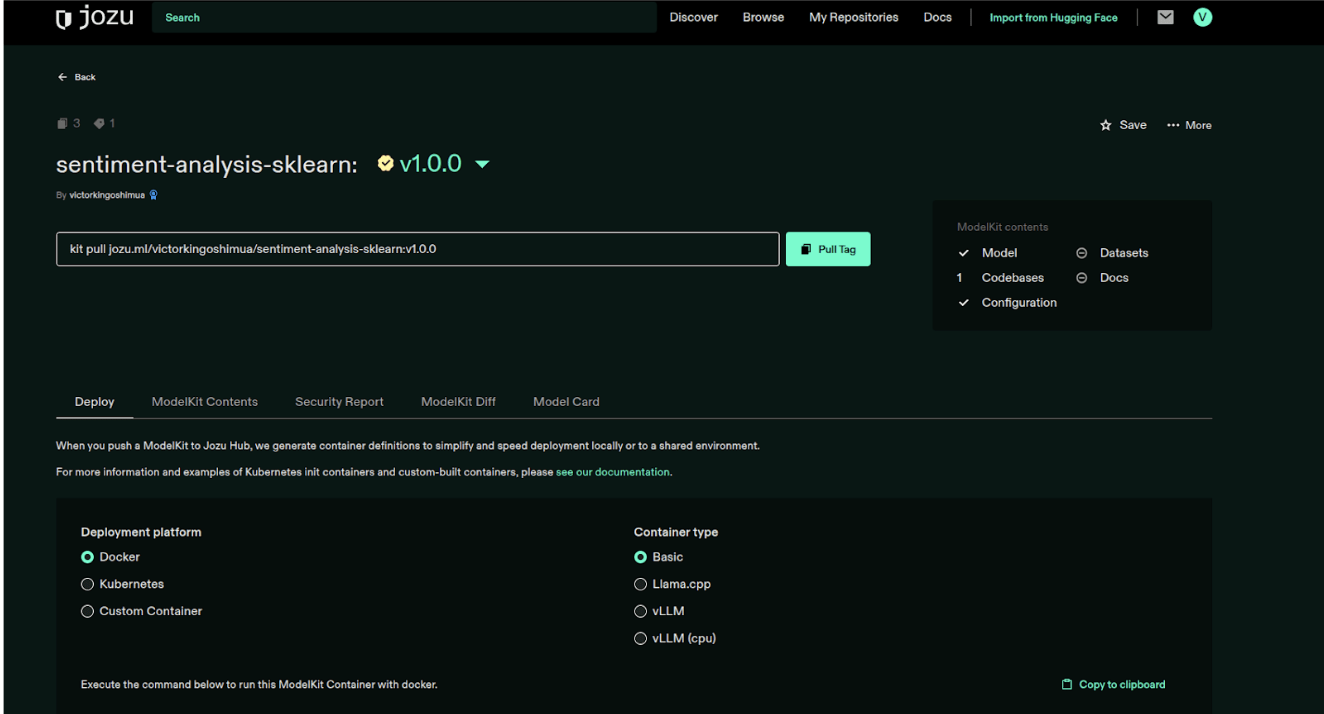
Jozu enables these workflows, especially in on-premises or enterprise environments where you control infrastructure:
Audit Logging: Jozu maintains complete audit trails for ModelKits, datasets, deployments, and changes across model versions. You can inspect who deployed what, when it was deployed, and to which environment—critical for compliance and debugging production issues.
Security Scanning: Before a ModelKit serves traffic, Jozu enforces policies regarding vulnerabilities, dependencies, and constraints you define. This prevents models with known security issues from reaching production.
Inference Deployment: Models packaged as ModelKits remain immutable and portable. Inference behavior matches exactly what was tested because the environment is identical. No more "works on my machine" problems.
Troubleshooting
W&B login fails:
# Re-authenticate with your API key
wandb login --relogin
KitOps push fails with authentication error:
- Verify your
.envcredentials are correct - Check namespace matches your Jozu Hub username exactly
- Authenticate manually:
kit login jozu.ml
ModelKit is missing files:
- Check file paths in your Kitfile match actual file locations
- Verify files exist before running
pack_and_push_modelkit() - Use absolute paths or ensure working directory is correct
Can't reproduce model metrics from W&B:
- Check the W&B run ID in your ModelKit metadata
- Verify the same dataset version and split were used
- Compare library versions (check the SBOM in Jozu Hub)
- Ensure random seeds match between training runs
Package installation issues:
# If pip install fails, try updating pip first
pip install --upgrade pip
pip install wandb scikit-learn joblib matplotlib python-dotenv kitops
Conclusion
This workflow gives you end-to-end model lineage: from experiment tracking in W&B to production deployment via Jozu Hub. When a model fails in production, you can trace back to the exact dataset, hyperparameters, and training run.
Key takeaways:
- W&B handles experimentation—track everything, compare runs, find what works
- KitOps handles packaging—reproducible artifacts with full dependency manifests
- Jozu Hub handles governance—audit trails, security scanning, and compliance for enterprise deployments
For production ML systems, this eliminates the "works on my machine" problem that plagued software engineering before Docker. ModelKits do the same for ML—guaranteeing that what you trained is exactly what you deploy.
Next steps: