
Introduction
When dealing with production applications that involve large language models or machine learning, bad releases are inevitable. The usual suspects (wrong weights, bad training data, broken prompts, or a flaky export) degrade model responses. In these scenarios, the best course of action is a rollback. But when it comes to machine learning, that's often easier said than done.
With KitOps ModelKits, rollback is a tag flip: point the deployment back to a known-good packaged model (code, weights, and config) and restart. The runtime image stays put; only the reference changes. In Kubernetes, you update MODELKIT_REF. On edge, you switch the image tag. No rebuilds, no container surgery.
The result: faster recovery from bad training data or degraded output, reduced MTTR, limited blast radius (because the runtime never changes), and change control that stays clean and auditable.
What "rollback" means in a ModelKit pipeline
A ModelKit is an immutable OCI artifact that bundles your model's code, weights, and config, published with a tag and digest. You ship a versioned package with clear tags (v1, v2, prod-2025-10-07, etc.) that you can pull anywhere.
At deploy time, you don't bake the model into the app image. Instead, you point the runtime to a reference for which ModelKit to load. In Kubernetes, that reference is an environment variable like MODELKIT_REF, read by the init-container, which pulls and unpacks to /model. On edge or single-host deployments, the reference is simply the image tag you run from Jozu Hub's "Deploy → Docker" option.
Rollback means swapping that reference to a different, known-good tag (for example, from v7 back to v5) and restarting. The runtime image stays the same; only the ModelKit changes. No image rebuilds, just a controlled tag flip you can audit and automate.
Deployment patterns built for rollbacks
Kubernetes (init-container pattern): KitOps uses specialized init containers (kitops-init) that pull model artifacts from MODELKIT_REF references, verify signatures, and unpack to shared volumes before the main application starts. Rollbacks are seamless: simply update the MODELKIT_REF environment variable and restart the deployment. The init container handles the heavy lifting of model extraction, while the main container focuses purely on inference.
This deployment snippet shows the pattern in action:
initContainers:
- name: kitops-init-model
image: ghcr.io/kitops-ml/kitops-init:latest
env:
- name: MODELKIT_REF
value: "jozu.ml/arnabchat2001/modelkit-demo:v7"
Edge/single host: For edge deployments, KitOps generates runtime containers tied to specific model tags. Rollbacks involve simply re-running with a previous tag or updating systemd/MDM templates. The runtime containers are pre-built with the necessary inference engines (Basic, vLLM, or llama.cpp), making rollbacks as simple as changing a Docker tag.
Key benefit: Both patterns ensure atomic rollbacks without complex state management. The model artifact is the only thing that changes, while the inference infrastructure remains stable.
Setup: setting the stage
What you'll run (once): a tiny FastAPI app that reads its model from /model, two ModelKits in Jozu Hub (v1 = GOOD, v2 = BAD), and a Kubernetes Deployment that uses an init-container to unpack the ModelKit before the app starts. Grab the full code and step-by-step instructions in the repo, which has everything you need to clone, run, and reproduce the rollbacks end-to-end.
Repo layout (minimal):
| rollback/
├─ Kitfile
├─ model/ # qwen2-0_5b-instruct-q4_k_m.gguf
├─ src/ # FastAPI app (reads MODEL_PATH=/model)
│ └─ app.py
├─ k8s/
│ ├─ deployment.yaml # kitops-init + MODELKIT_REF + shared volume
│
└─ helm-chart/
├─ Chart.yaml
├─ values.yaml # defaults (good)
├─ values-prod.yaml # "bad" tag for demo
└─ values-rollback.yaml # known-good tag
Kitfile (essentials):
This is generated by running kit init . and follow the prompts, also you can go through the official Getting Started Tutorial
manifestVersion: 1.0.0
package:
  name: modelkit-demo
  description: demo for rollback with modelkit
  authors: [Arnab Chatterjee]
model:
  path: ./model       # contains qwen2-0_5b-instruct-q4_k_m.gguf AND version.txt
code:
  - path: ./src         # your FastAPI app only
Kubernetes (excerpt):
spec:
  volumes: [{ name: model-store, emptyDir: {} }]
  initContainers:
    - name: kitops-init
      image: ghcr.io/kitops-ml/kitops-init:v1.0.0
      env:
        - name: MODELKIT_REF  # flip this tag to roll back/forward
          value: "jozu.ml/<ns>/modelkit-demo:v2"
        - name: UNPACK_PATH
          value: "/model"
      volumeMounts: [{ name: model-store, mountPath: /model }]
  containers:
    - name: api
      env: [{ name: MODEL_PATH, value: "/model" }]
      volumeMounts: [{ name: model-store, mountPath: /model }]
Build the two tags (one-time):
# v1 (GOOD)
echo "GOOD" > model/version.txt
kit pack . -t jozu.ml/<ns>/modelkit-demo:v1 && kit push jozu.ml/<ns>/modelkit-demo:v1
# v2 (BAD)
echo "BAD" > model/version.txt
kit pack . -t jozu.ml/<ns>/modelkit-demo:v2 && kit push jozu.ml/<ns>/modelkit-demo:v2Minikube smoke test:
minikube start --cpus=2 --memory=4096
kubectl apply -f k8s/ && kubectl rollout status deploy/modelkit-demo
kubectl port-forward svc/modelkit-demo 8080:80
curl -s http://localhost:8080/health
curl -s http://localhost:8080/model/info   # should reflect current tag (e.g., BAD)
Playbook A: GitOps rollback with Helm (on-prem / regulated)
For teams that need governance and an audit trail, GitOps + Helm makes rollbacks boring (in a good way). You change a value, run the pipeline (or let your GitOps controller sync), and Kubernetes does the rest. Every step is visible in Git and policy-checked.
The flow
- Change values via PR: Flip the ModelKit reference from the bad tag to the known-good tag.
- Policy gates: Reviewers approve; policy checks enforce allowlisted tags and signature requirements.
- Merge & sync: Your GitOps controller applies the change.
- Rollout: The init container pulls the new ModelKit; pods restart and stabilize.
Approach 1 : Values file (GitOps-style)
Deploy the “bad” tag:
helm upgrade --install modelkit-demo ./helm-chart -f helm-chart/values-prod.yaml
kubectl rollout status deploy/modelkit-demo
Confirm what’s running:
curl -s <http://localhost:8000/version>
# BAD-1761225541
Roll back to the “good” tag via values: Update the Helm values to point at the known-good tag. Change it locally for a direct deployment, or push the change to GitHub if you’re running GitOps.
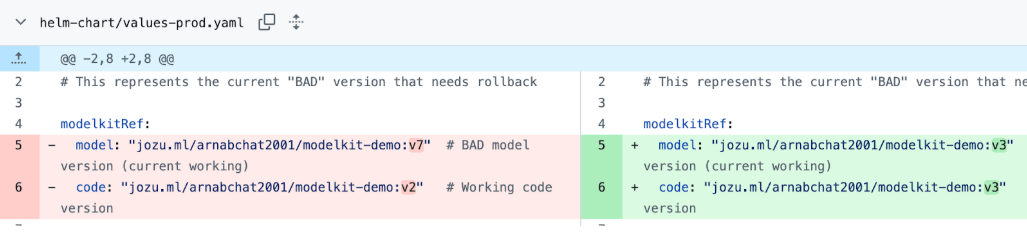
helm upgrade modelkit-demo ./helm-chart -f helm-chart/values-rollback.yaml
kubectl rollout status deploy/modelkit-demo
Verify the rollback:
curl -s <http://localhost:8000/version>
# GOOD
curl -s <http://localhost:8000/model/info>
# {"loaded":false,"model_available":true,
# "model_path":"/model/model/qwen2-0_5b-instruct-q4_k_m.gguf",
# "version":"GOOD","status":"Building llama-cpp-python..."}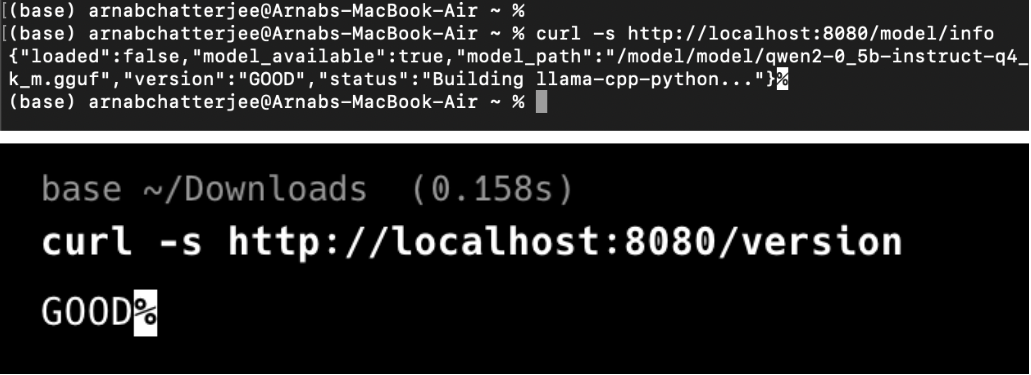
It shows that the only change was the values pointing to a different tag; the init container re-pulled the ModelKit, and the API flipped from BAD → GOOD.
Approach 2: Inline flags (direct control)
Same outcome, driven from the CLI (handy for demos or hotfixes):
helm upgrade modelkit-demo ./helm-chart \
  --set modelkitRef.model=jozu.ml/<ns>/modelkit-demo:v3 \
  --set modelkitRef.code=jozu.ml/<ns>/modelkit-demo:v3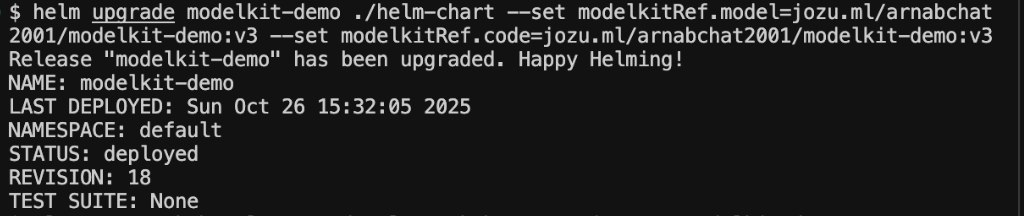
kubectl get pods -l app.kubernetes.io/name=modelkit-demo
# verify if rollback is successfull 
Here's the smoothed-out version:
Why this playbook
This approach gives you an audit trail by default through Git history, one-line values changes that keep blast radius small, policy enforcement so only approved tags promote, and declarative rollback with no rebuilds and no drift. Reviewers, allowlists, and signatures keep rollbacks safe and compliant.
Ideal for on-prem and regulated environments where you need fast reversions and a clean record of who changed what, when, and to which ModelKit tag.
Playbook B : Imperative Kubernetes
When to use: Emergencies and simple runbooks where you need the fastest possible rollback.
How it works: You flip the deployed reference in place. Changing an env var on a Deployment creates a new ReplicaSet; the init container re-pulls the ModelKit for that tag, and the pod comes up on the known-good version. No rebuilds.
Command:
kubectl set env deploy/modelkit-demo \\
  MODELKIT_REF=jozu.ml/arnabchat2001/modelkit-demo:v3
kubectl rollout status deploy/modelkit-demo
Evidence from our run:
# Before (v7)
curl -s <http://localhost:8000/version>
# BAD-1761225541
# Roll back
kubectl set env deploy/modelkit-demo MODELKIT_REF=jozu.ml/arnabchat2001/modelkit-demo:v3
kubectl rollout status deploy/modelkit-demo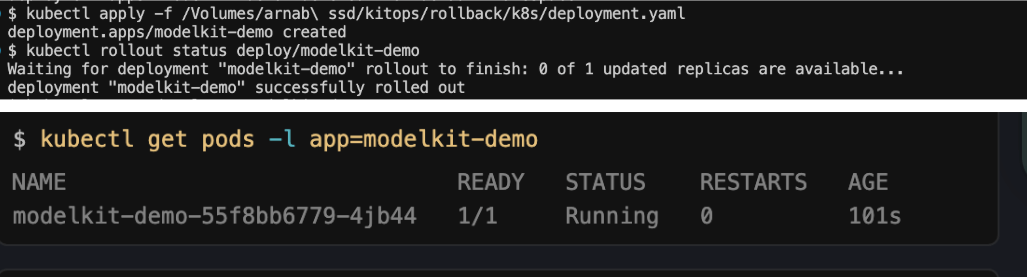
# After (v3)
curl -s <http://localhost:8000/version>
# GOOD
Why this is fast: kubectl set env automatically triggers a restart. No manual rollout restart needed and kitops-init does the heavy lifting by fetching the correct ModelKit during pod init.
Playbook C : Edge / Single Host (Docker)
For edge devices and single-host deployments, Docker provides the simplest and most reliable rollback mechanism. This approach uses the classic "stop → swap image tag → start" pattern, making it ideal for IoT devices, edge servers, and development environments where simplicity and speed are paramount.
The edge flow
- Stop: Gracefully stop the current container.
- Swap: Replace with a different image tag (only the tag changes).
- Start: Launch the new container with the rollback version.
Deploy Initial Version:
$ docker run -d --name modelkit-edge -p 8000:8000 \\\\
  -e MODELKIT_REF=jozu.ml/arnabchat2001/modelkit-demo:v7 \\\\
  jozu.ml/<ns>/modelkit-demo:v7

Unable to find image 'jozu.ml/arnabchat2001/modelkit-demo:v7' locally
v7: Pulling from arnabchat2001/modelkit-demo
Digest: sha256:30dfc728495056b73b239868f50d78e4af55ff9de088e55f86e02e1e37c71891
Status: Downloaded newer image for jozu.ml/arnabchat2001/modelkit-demo:v7
a1b2c3d4e5f6g7h8i9j0k1l2m3n4o5p6q7r8s9t0
$ curl -s http://localhost:8000/version
BAD-1761225541Rollback to Good Version:
$ docker rm -f modelkit-edge
modelkit-edge
$ docker run -d --name modelkit-edge -p 8000:8000 \\\\
-e MODELKIT_REF=jozu.ml/arnabchat2001/modelkit-demo:v3 \\\\
jozu.ml/arnabchat2001/modelkit-demo:v3
b2c3d4e5f6g7h8i9j0k1l2m3n4o5p6q7r8s9t0u1$ curl -s <http://localhost:8000/version>
GOODAlternative: We can use Docker Compose For development and testing, Docker Compose simplifies the process of running and managing containers.
# Deploy with compose
$ docker-compose up -d

Creating network "edge-deployment_default" ... done
Creating volume "edge-deployment_model_data" ... done
Creating volume "edge-deployment_app_data" ... done
Creating edge-deployment_modelkit-edge_1 ... done
# Rollback by updating docker-compose.yml MODELKIT_REF
$ docker-compose down
Stopping edge-deployment_modelkit-edge_1 ... done
Removing edge-deployment_modelkit-edge_1 ... done$ docker-compose up -d
Creating edge-deployment_modelkit-edge_1 ... doneModel Info Verification:
$ curl -s http://localhost:8000/model/info

{"loaded":false,"model_available":true,"model_path":"/model/model/qwen2-0_5b-instruct-q4_k_m.gguf","version":"GOOD","status":"Building llama-cpp-python..."}
Governance: Edge devices maintain a small allowlist of "blessed tags" they may run:
ALLOWED_TAGS=(
    "v3"    # Good/stable version
    "v7"    # Current production version
    "v2"    # Previous stable version
)
Benefits:
This approach offers simplicity (single-command rollback), speed (immediate container replacement), reliability (no complex orchestration dependencies), edge-friendly operation (minimal resource requirements), and development readiness (Docker Compose for local testing).
Perfect for edge computing, IoT deployments, and teams that prioritize operational simplicity over complex orchestration. You can use this GitHub repo as a reference to dig deeper or try reproducing it on your own.
Tagging & promotion policy best practices
Use two kinds of tags and keep them straight. Immutable tags like release-<gitsha> never move; they point to the exact bits that ran and form your audit anchor. Promoted tags like prod-<YYYYMMDD> or canary are pointers you move on purpose.
Promotion or rollback is just retagging the reference you deploy (Helm values, MODELKIT_REF, or Docker tag). You don't rebuild or repack.
A few guardrails that help in practice: allowlist the tags your cluster or edge devices may run (store that list in Git/MDM), prune old promoted tags so humans don't pick the wrong one, and record the digest you actually ran (sha256:…) in logs and change notes. That's your ground truth.
Integrity & policy controls
Treat model versions like software releases:
-
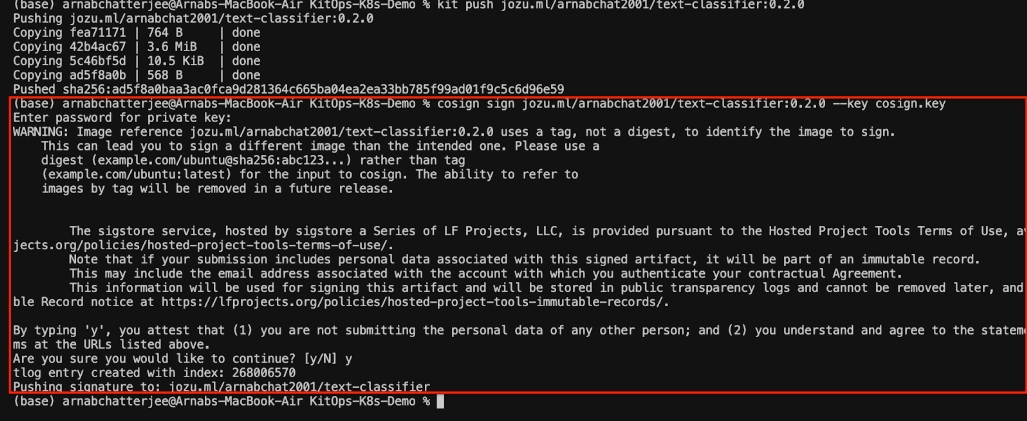
Sign on push: use Cosign in CI (keyless or key-pair) and attach provenance. With this you can prove who built and pushed
release-<gitsha>.
-
Verify on pull:
- Kubernetes: verify signatures in the init step (or via an admission/GitOps policy) and fail closed on mismatch.
- Edge: verify in the startup script or enforce with your container runtime policy.
-
Enforce with policy: block unsigned or non-allowlisted tags, require provenance to promote
canary → prod. -
Audit: on startup, log the tag + resolved digest + signer and ship it to your SIEM. If verification fails, auto-revert to last known-good and alert on-call.
Failure modes → fast paths
When signature verification fails, fail closed and point the container to the last known-good tag. Your runbook should page on-call and offer a one-click reversion to that tag.
If an artifact is missing or mistagged, apply the same principle: policy auto-reverts to the previous promoted tag, or halts so nobody ships an unknown build.
Edge fleets add a twist: cold caches make rollbacks slower. Pre-stage the top N tags during maintenance windows so a rollback is just a tag flip with no pull penalty. In all cases, prefer deterministic behavior over "best effort," and make the recovery path the easiest button in the room.
Close
Rollbacks shouldn't need new images or redeployed code paths. With Jozu + KitOps, promotion and rollback are controlled tag changes that leave your runtime steady and swap only the ModelKit. The result is fast, auditable recovery that works the same in an on-prem cluster and on a single edge box: lower MTTR, smaller blast radius, cleaner change control.
Want to dig deeper? Clone the GitHub repo and reproduce the rollbacks end-to-end.