

Imagine you're working on a churn prediction model. As usual, you start experimenting in a Jupyter notebook using your favourite libraries; you then move on to build a satisfactory model in the notebook.
However, an end-to-end machine learning project doesn't stop there. Now you need to deploy the model or even make it available to team members for testing and auditing.
This brings you to questions like:
-
How do you share the exact code, dataset, and hyperparameters used to train this model?
-
How do you record which environment and dependency versions were used?
-
What changed between this and the last successful run, and why?
-
How can a new team member reproduce or extend this model without breaking things?
-
Can this model be safely rolled back or redeployed in a different environment?
To answer these questions, we need to understand that, at this stage, the entire ML project is scattered. The project code has been developed in Jupyter notebooks; datasets may live in cloud storage; models are serialised in various formats; dependencies may be managed by Conda or left undocumented.
Essentially, the solution to all of these is a tool that can bundle your model and everything needed to run it, which includes datasets, training code, config files, and documentation, into a single, shareable artifact.
This is where KitOps ModelKit comes in, and in this article, we will discuss how to utilise PyKitOps, a Python SDK for working with ModelKits, to make packaging ML projects easy.
We'll get practical by training a churn prediction model from scratch in a Marimo notebook.
Overview of the KitOps Python SDK
Just like other popular Python ML libraries out there, PyKitOps aims to simplify and standardise the machine learning workflow. It is primarily used for interacting with KitOps ModelKits.
Before moving on, let's take a moment to understand how the whole KitOps ecosystem works together. You see, the entire umbrella that covers everything is KitOps itself.
Under this umbrella, we have:
-
ModelKit: a standardized, OCI-compliant way of packaging all the artifacts of your ML project. This includes your dataset, model, training script, and more.
-
Kitfile: a YAML configuration file that defines what goes into a KitOps ModelKit.
-
Kit CLI: a command-line tool used to interact with ModelKits. You can use it to create ModelKits or work with existing ones.
Now, bringing everything together, the PyKitOps SDK is a way to easily work with ModelKits programmatically. You can use it to define a Kitfile, which in turn becomes a ModelKit.
Overview of Marimo
To build the churn prediction model, we will start from a Jupyter notebook, and make our notebook experience better by using Marimo, a modern, reactive Python notebook that brings structure and interactivity to the machine learning workflow.
In traditional Jupyter notebooks, execution order can sometimes become messy and lead to hidden bugs. Marimo solves this problem through its reactive execution model.
This means whenever you change a variable or update a function, all dependent cells are automatically re-evaluated or marked as outdated. No more guessing whether your outputs are in sync with your code.
Apart from reactivity, it also solves other pain points in traditional notebooks:
-
It stores notebooks as plain Python files (
.py), not JSON. That means better Git integration, easier code reviews, and zero merge conflicts due to metadata noise. -
You can define lightweight UI widgets like sliders and dropdowns without writing frontend code; this gives you real-time parameter tuning or interactive visualisations.
-
It's testable: since notebooks are pure Python, you can apply
pytestor other test frameworks to ensure reliability before deployment. -
You can run it as a script, app, or even a slide deck, making your work portable and presentation-ready.
To get started with Marimo
First, install Marimo via pip:
pip install marimoThen launch a Marimo notebook:
marimo editLimitations with Packaging ML models
Machine learning development is often fragmented. Multiple tools, teams, and environments are involved, which makes it hard to reproduce results consistently.
It is practically impossible to take machine learning (ML) models to production without handling packaging. This involves bringing together all model artifacts, dependencies, configuration files, and metadata into a unified format for sharing and reuse.
Here are some of the key challenges:
-
Environment diversity: ML models need to run across different environments, including cloud, mobile, and edge devices, each with its own constraints. A model that performs well in the cloud may fail on a mobile device without proper optimisation or packaging.
-
Cross-team collaboration: ML development involves different teams such as data scientists, ML engineers, software developers, and DevOps. These teams often use different tools, languages, and workflows. Without a unified approach, the handoff between teams can result in models that behave inconsistently or fail.
-
Dependency management: ML projects depend on numerous libraries and frameworks. Managing these dependencies, especially across different versions, is critical. Mismatches can lead to runtime errors, unexpected behaviours, or failures to reproduce results. Installing and configuring all dependencies correctly is time-consuming and error-prone.
This brings us to an important question: what are the best practices for handling packaging?
The answer is simple: use the right tool for the job. And when it comes to packaging ML models, there's no better tool than KitOps.
How KitOps Solves These Problems
So far, we've highlighted the challenges that come with taking ML models to production, and we've seen that the right answer to those challenges is KitOps. Now, let's take a moment to understand how KitOps solves them.
KitOps makes model packaging effortless by bundling your entire ML project code, data, dependencies, and configuration into a single, portable unit called a ModelKit. This eliminates the guesswork and friction teams usually face when trying to move models from experimentation to production.
So when someone asks, "What data trained this model?" or "What version is running in production?" you'll have clear, traceable answers backed by a single, shareable artifact that works across your stack.
ModelKits still goes further to support the entire ML development lifecycle by offering:
-
End-to-end versioning and traceability of your models, datasets, configs, and logs
-
The ability to push ModelKits to any OCI-compliant registry like Docker Hub, GitLab, or Harbor
-
Selective unpacking a ModelKit, so you can retrieve just what you need, whether it's only the model, the dataset, or the training code
-
Reproducible pipelines across dev, test, and production environments to ensure consistency from training to deployment
-
Immutable and tamper-proof artifacts that reduce the risk of silent errors or unexpected changes
-
AI-BOM (AI Bill-of-Materials) generation
Building and Packaging a Churn Prediction Model
Throughout this article, we've discussed how to package ML models for production. Now, let's get hands-on by building a practical example
Prerequisites
Before we get started, make sure you've completed the following setup steps:
-
Download the dataset
Head over to Kaggle's Telco Customer Churn dataset, download it, and unzip the files into a new project directory. -
Install the Kit CLI
Follow the official installation guide to install the Kit CLI for your machine. -
Install the KitOps Python SDK
pip install kitopsStep 1: Training ML model in Marimo
- Launch Marimo by running the following command in your CLI; this will open a clean, interactive UI in your browser where you can easily create and manage a notebook.
marimo edit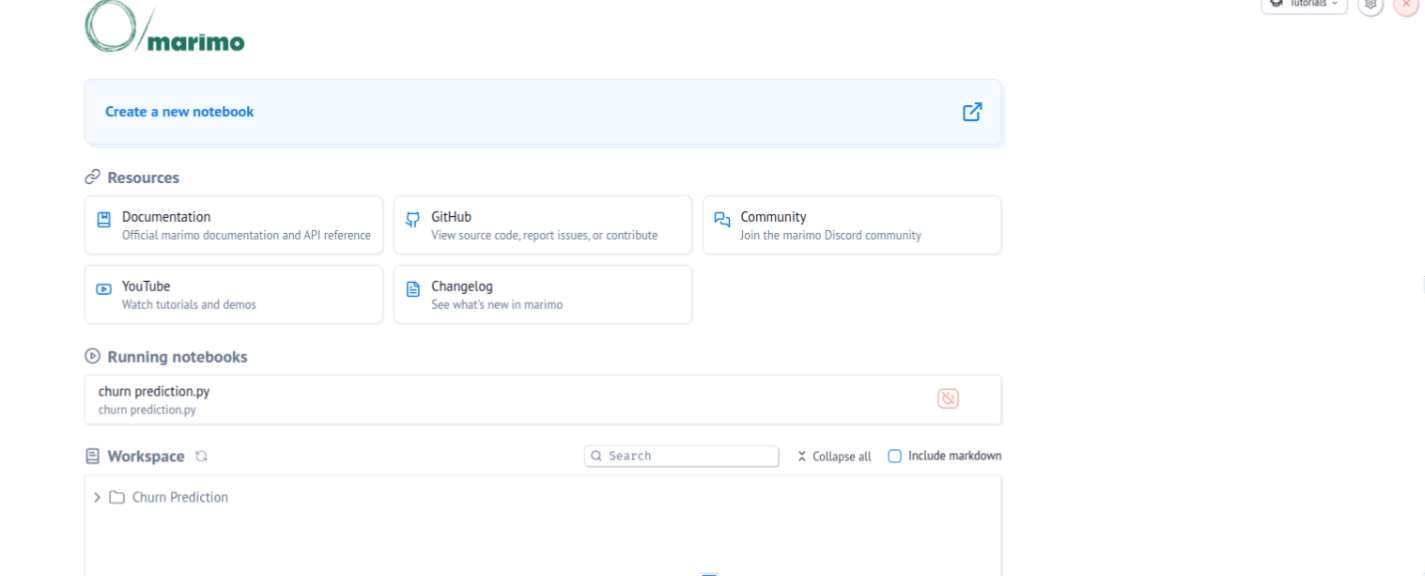
- Next, let's run the necessary code to load the data and train the churn prediction model.
import pandas as pd
import numpy as np
import os
from sklearn.model_selection import train_test_split
from sklearn.linear_model import LogisticRegression
from sklearn.preprocessing import LabelEncoder, StandardScaler
from sklearn.metrics import classification_report, confusion_matrix, roc_auc_score, accuracy_score
import joblib
import matplotlib.pyplot as plt
import seaborn as sns
from kitops.modelkit.kitfile import Kitfile
from kitops.modelkit.manager import ModelKitManager

# Your existing ML code
df = pd.read_csv("WA_Fn-UseC_-Telco-Customer-Churn.csv")

# Drop rows with NA
df.dropna(inplace=True)
df.drop(['customerID'], axis=1, inplace=True)

# Encode categorical columns
for column in df.select_dtypes(include="object").columns:
    le = LabelEncoder()
    df[column] = le.fit_transform(df[column])

# Prepare features and target
X = df.drop('Churn', axis=1)
y = df['Churn']

# Scale features
scaler = StandardScaler()
X_scaled = scaler.fit_transform(X)

# Train/test split
X_train, X_test, y_train, y_test = train_test_split(
    X_scaled, y, test_size=0.2, random_state=42
)

# Train model
model = LogisticRegression(solver='lbfgs', max_iter=1000, random_state=42)
model.fit(X_train, y_train)

# Predictions
y_pred = model.predict(X_test)
y_pred_proba = model.predict_proba(X_test)[:, 1]

# Evaluation
accuracy = accuracy_score(y_test, y_pred)
f1_score = classification_report(y_test, y_pred, output_dict=True)['1']['f1-score']
roc_auc = roc_auc_score(y_test, y_pred_proba)

print("\nAccuracy:", round(accuracy, 3))
print("F1-Score:", round(f1_score, 3))
print("ROC-AUC:", round(roc_auc, 3))
Result:
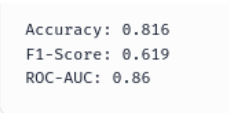
We've trained a simple logistic regression model to predict customer churn, which had an accuracy of 81%. Let's say we are satisfied with this performance; now, let's move on to packaging the model with the PyKitOps SDK.
- Next, go ahead and save the trained model.
# Create models directory if it doesn't exist
os.makedirs("models", exist_ok=True)

# Save model
joblib.dump(model, "models/churn_prediction_model.joblib")
Step 2: Package the model with PyKitOps
- Instantiate a new Kitfile for the project and create its metadata. A key thing to note is that working with a Kitfile programmatically is as simple as working with a Python dictionary.
# Create the Kitfile programmatically
kitfile = Kitfile()

# Set manifest version
kitfile.manifestVersion = "1.0"

# Package metadata
kitfile.package = {
    "name": "telco-churn-prediction",
    "version": "1.0.0",
    "description": "Logistic regression model for predicting telecom customer churn",
    "authors": ["Your Name"],
    "license": "MIT"
}- Update the model information for the Kitfile
# Model information
kitfile.model = {
    "name": "churn-prediction-model",
    "path": "models/churn_prediction_model.joblib",
    "framework": "scikit-learn",
    "version": "1.0.0",
    "Description": "Logistic regression model for churn prediction"
    "license": "MIT",
}- Add the model training script. Remember, Marimo renders the training notebook as a Python file.
# Code files
kitfile.code = [
    {
        "path": "churn_prediction.py",
        "description": "Main training script for churn prediction model",
        "license": "MIT"
    }
]- Add the dataset
# Dataset information
kitfile.datasets = [
    {
        "name": "telco-customer-churn",
        "path": "data/WA_Fn-UseC_-Telco-Customer-Churn.csv",
        "description": "Telco customer churn dataset with customer demographics and service information",
        "license": "Public Domain",
        "metadata": {
            "rows": len(df),
            "columns": len(df.columns),
            "target_distribution": {
                "churn": int(y.sum()),
                "no_churn": int(len(y) - y.sum())
            }
        }
    }
]- We've created a blueprint for the ModelKit; let's save it and see how it looks.
# Save the Kitfile
kitfile.save("Kitfile")
print("\nKitfile created successfully!")
print("\nKitfile contents:")
print(kitfile.to_yaml())
Step 3: Push the ModelKit to a container registry (Jozu Hub)
Jozu Hub is a centralized model registry and package repository provided by Jozu ML that is deployed on-prem. For this demo, we will push our model to Jozu's hosted sandbox environment where they allow KitOps community members to publish, store, and share packaged machine learning projects or models.
Think of Jozu Hub like:
-
Docker Hub: But for machine learning projects
-
PyPI or Hugging Face Hub: But designed specifically for full ML packages, not just models
-
MLflow Model Registry: But cloud-hosted and focused on standardised packaging and deployment
Pushing a ModelKit to Jozu Hub helps you properly version and package your model, which in turn eases collaboration and deployment.
To get started:
- Sign up for an account
- Create a .env file in the root of your project directory and add your details.
JOZU_USERNAME=johndoe@xyz.com
JOZU_PASSWORD=your_password
JOZU_NAMESPACE=johndoe- Next, you can proceed to push the ModelKit by running this code
# Push to Jozu Hub
from dotenv import load_dotenv
load_dotenv()

username = os.getenv("JOZU_USERNAME")
password = os.getenv("JOZU_PASSWORD")
namespace = os.getenv("JOZU_NAMESPACE")

modelkit_tag = "jozu.ml/your_user_name/telco-churn-prediction:v1.0.0"
manager = ModelKitManager(
     working_directory=".",
     modelkit_tag=modelkit_tag
 )
manager.kitfile = kitfile
manager.pack_and_push_modelkit(save_kitfile=True)
print(f" ModelKit pushed to {modelkit_tag}")
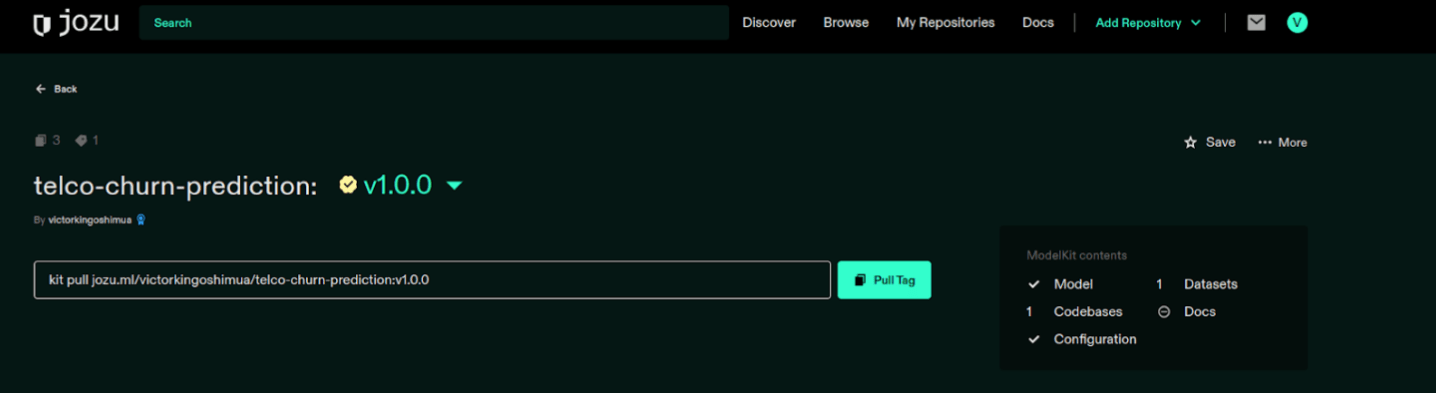
You will receive a message indicating that the model kit has been successfully pushed to Jozu Hub.
Now, if you head to your Jozu Hub repository, you will see the pushed ModelKit.
Conclusion
KitOps aims to bring structure and clarity to the machine learning development process. In this article, we explored how KitOps helps take an ML project from local training in a Marimo notebook, using a churn prediction use case, to fully reproducible packaging.
Our focus was on how the KitOps SDK, PyKitOps, simplifies and supports your model development workflow. But this is just the beginning. KitOps is applicable across a wide range of ML domains, helping teams improve reproducibility, traceability, and deployment readiness throughout the machine learning lifecycle.
To learn more about what KitOps can offer for your ML projects, visit the official platform.