

Browser agents are great at the boring stuff. Open the support dashboard, read the tickets, summarize what's going on. The catch is that everything the agent reads on the page goes to the model.
On a typical SaaS (software as a service) dashboard that means customer names, account IDs, contact details, and internal notes. Some of that the agent needs to do its job. Some of it has no business leaving your device.
In this tutorial you'll use Agent Guard Policy Gateway with the browser subagent in Google Antigravity to redact customer account IDs before they reach the LLM (large language model). You'll build a small fake support dashboard, add a custom redaction rule, and check that the agent can still do useful work without ever seeing the raw IDs.
What you'll build
You'll work with a fictional customer support dashboard with four records. Each one has a customer name, account ID, plan, support issue, and internal note.
The browser agent reads the page and answers a question about it. Agent Guard inspects the traffic headed for the model and masks account IDs like ACCT-48291 before they leave the Mac.
Prerequisites
Before you start, you need:
- A Mac with Apple Silicon running a supported version of macOS.
- Agent Guard Policy Gateway installed. Grab the latest build from the Agent Guard releases page on GitHub and follow the Agent Guard quickstart.
- Agent Guard v0.9.6 or later for the commands used in this walkthrough.
- Google Antigravity, or another browser agent with interactive browser support.
- Google Chrome with remote debugging enabled (covered below).
- Python 3 to serve the local test page.
- Terminal access with administrator privileges for restarting the gateway.
New to Agent Guard? The overview explains how it works, and How policies work covers the policy model this tutorial builds on.
Note: Use fictional customer data for this walkthrough. Don't test with real customer records or production SaaS data.
You can confirm that Policy Gateway is running with:
agentguard gateway statusThe two lines that matter look like this:
Readiness        ready (policies loaded)
Capture          Network Extension, active
If Capture isn't active, Agent Guard isn't inspecting the browser agent's model traffic (and nothing below will work).
Create the SaaS test dashboard
Make a folder for the demo:
mkdir -p ~/Documents/agentguard-browser-saas-demo
cd ~/Documents/agentguard-browser-saas-demo
Then create an index.html file, the HTML (HyperText Markup Language) page for the fake dashboard:
nano index.htmlPaste in this HTML, which renders four fictional customer records:
<!DOCTYPE html>
<html lang="en">
<head>
  <meta charset="UTF-8" />
  <title>Customer Support Dashboard</title>
  <style>
    body {
      font-family: Arial, sans-serif;
      max-width: 1100px;
      margin: 40px auto;
      padding: 0 20px;
    }

    table {
      width: 100%;
      border-collapse: collapse;
    }

    th, td {
      border: 1px solid #ddd;
      padding: 12px;
      text-align: left;
    }

    th {
      background: #f4f4f4;
    }
  </style>
</head>
<body>
  <h1>Customer Support Dashboard</h1>

  <table>
    <thead>
      <tr>
        <th>Customer</th>
        <th>Account ID</th>
        <th>Plan</th>
        <th>Support Issue</th>
        <th>Internal Note</th>
      </tr>
    </thead>
    <tbody>
      <tr>
        <td>Ada Miller</td>
        <td>ACCT-48291</td>
        <td>Enterprise</td>
        <td>Unable to export monthly report</td>
        <td>Follow up before Friday</td>
      </tr>
      <tr>
        <td>Noah Smith</td>
        <td>ACCT-73104</td>
        <td>Pro</td>
        <td>Billing page returns an error</td>
        <td>Issue reproduced by support</td>
      </tr>
      <tr>
        <td>Maya Chen</td>
        <td>ACCT-20567</td>
        <td>Enterprise</td>
        <td>SSO login fails for two users</td>
        <td>Escalated to identity team</td>
      </tr>
      <tr>
        <td>Liam Johnson</td>
        <td>ACCT-91835</td>
        <td>Starter</td>
        <td>Needs help changing workspace owner</td>
        <td>Waiting for customer confirmation</td>
      </tr>
    </tbody>
  </table>
</body>
</html>
Save the file and start a local web server:
python3 -m http.server 8000Open http://localhost:8000 in Chrome. You should see the dashboard with four records.
Give Antigravity browser access
Antigravity's browser subagent drives Chrome through remote debugging. Without it, the agent may still fetch page content, but it can't navigate, click, or inspect the live page through Chrome DevTools.
In Chrome, go to chrome://inspect/#remote-debugging and turn on Allow remote debugging for this browser instance.
Back in Antigravity, check that the browser subagent can reach the dashboard:
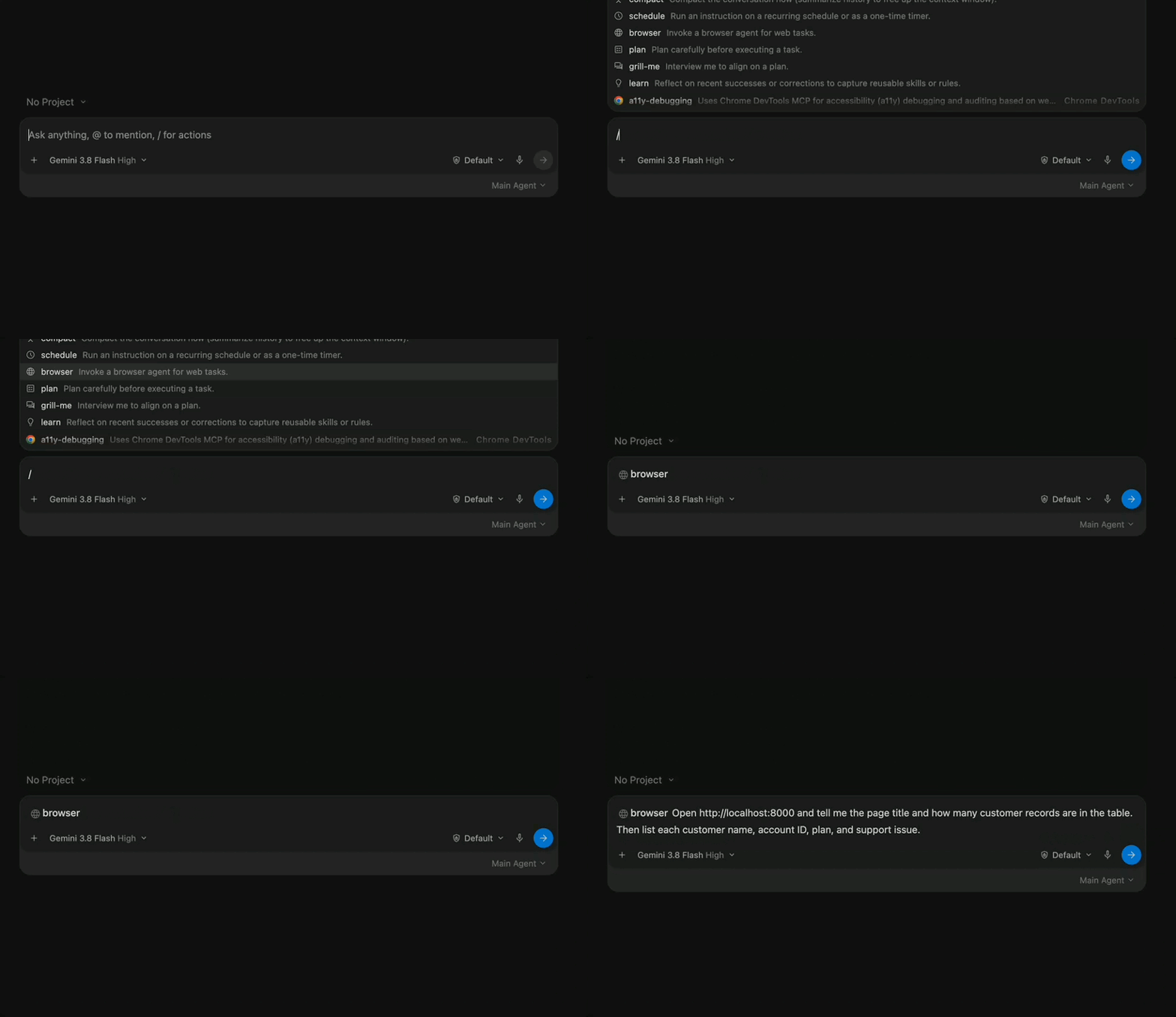
/browser Open http://localhost:8000 and tell me the page title and how many customer records are in the table.
In our test, Antigravity came back with the Customer Support Dashboard title and four records. Good, the agent can read the page. Now let's limit what it passes along.
Add the account ID redaction rule
Create a custom GuardrailPolicy file:
nano ~/.agentguard/policies/global/jozu.ml_jozu_agentguard-reference-policy--v2/z2-saas-account-id-redaction.yamlAdd this rule:
apiVersion: gerty.jozu.dev/v1
kind: GuardrailPolicy

metadata:
  name: z2-saas-account-id-redaction

spec:
  guardrails:
    - "*"

  direction: input

  action: Redact

  rules:
    - name: no-saas-account-ids
      assert: |
        !guardrail.findings.exists(f,
          (f.category == "body" ||
           f.category == "file" ||
           f.category == "json" ||
           f.category == "full_body") &&
          f.message.matches(
            "ACCT-[0-9]{5}"
          )
        )
      message: "Customer account ID detected, masked before transmission."
The rule looks for IDs in the ACCT-##### format the test dashboard uses. When Agent Guard finds one in model-bound content, action: Redact masks it and lets the rest of the request through. The policy schema reference covers every field if you want to adapt it.
Note: This drops the custom rule next to the reference policy for quick testing. Agent Guard manages that directory, so an update to the reference policy may replace it. Keep a copy of your rule, and for anything beyond a test, put it in its own source directory under
~/.agentguard/policies/global/or your organization's managed policy source.
Save the file, then restart Policy Gateway so it loads the new rule:
sudo agentguard gateway restartAnd check it's active:
agentguard gateway statusThe guardrail count should go up by one (8 to 9 in our test) with the Network Extension still active.
Test the redaction
Open a second terminal and watch the gateway logs:
agentguard logs --gatewayThen run the browser task again, this time asking for the IDs directly:
/browser Open http://localhost:8000 and tell me the page title and how many customer records are in the table. Then list each customer name, account ID, plan, and support issue.
In our test run, Antigravity still returned all four records, but every account ID came back as [redacted by Jozu]. Plans and support issues came through fine.
The gateway logs show the same thing:
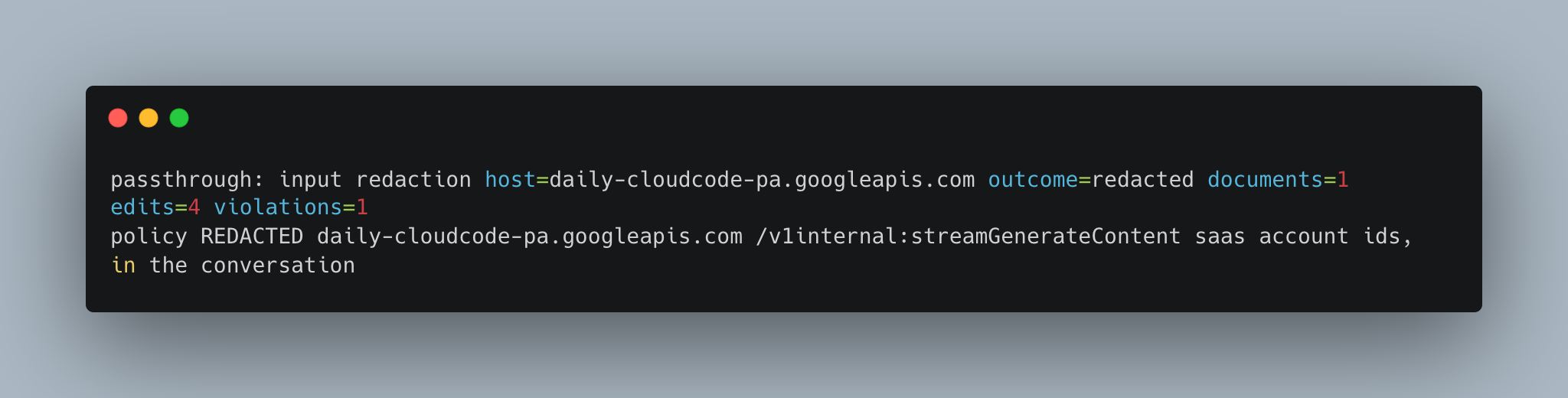
You'll see four edits, one per account ID on the dashboard. Later requests in the same session show more redaction events, because the agent keeps sending the conversation so far back to the model and the IDs get masked again each time. See Logs and audit for more on reading these entries.
The same rule shape works for customer IDs, tenant IDs, case numbers, or whatever internal reference codes your own SaaS apps use.
Best practices for protecting SaaS data
- Keep each rule focused on one field. A narrow pattern like
ACCT-[0-9]{5}is easier to test and less likely to mask things you wanted the agent to see. - Test with fictional records first, and confirm the agent can still use what's left.
- Run
agentguard gateway statusbefore testing and make sure the Network Extension is active. - Use
agentguard logs --gatewayto confirm the request was actually redacted or blocked. - Only protect the fields your workflow needs to protect. Over-redacting makes the agent useless.
- Re-run the exact same browser task after every policy change, so you're comparing like with like.
Wrapping up
What's worth noticing here is what still got through. Antigravity read the whole dashboard, counted the records, and reported every plan and support issue. It just never saw a real account ID.
That's the boundary you want for browser agents… let them work in the SaaS apps your team already uses, and decide centrally which fields never leave the device.
Try Agent Guard free and run this test on your own Mac, or talk to us about rolling these policies out across your team. For the details on GuardrailPolicy and redaction, see the Agent Guard policy documentation.