

Say a healthcare analyst wants ChatGPT to summarize appointment data from a spreadsheet. Totally reasonable. The problem is that the same file has phone numbers, email addresses, medical record numbers, dates of birth, and home addresses in it.
Upload that file as is and all of it leaves the device. Some of it is PHI (Protected Health Information), like the medical record numbers and anything tying a person to their care. Some of it is PII (Personally Identifiable Information), like the email addresses and phone numbers that point to a specific person in any context. In a patient file the two overlap (an email next to a diagnosis code is both), and you want neither one going to the model.
You want the model to see the appointment reasons. You don't want it to see who the patients are.
In this tutorial you'll use Agent Guard Policy Gateway to inspect an Excel spreadsheet for PHI and PII before it reaches an AI model. Agent Guard's shipped reference policy will handle phone numbers, and you'll add a custom GuardrailPolicy for email addresses before testing both protections together.
What you'll build
You'll work with a fictional patient appointment spreadsheet containing fields such as patient_name, date_of_birth, email, phone, address, medical_record_number, diagnosis_code, appointment_reason, clinician_notes, etc.
You'll verify two protections:
- Phone numbers, handled by Agent Guard's shipped reference policy.
- Email addresses, handled by a custom redaction rule you'll add.
Both are PII on their own, and PHI once they sit next to health data. You can extend the same approach later for medical record numbers, organization-specific patient IDs, or other identifiers your environment treats as sensitive.
Prerequisites
Before you start, you need:
- A Mac with Apple Silicon running a supported version of macOS.
- Agent Guard Policy Gateway installed. Grab the latest build from the Agent Guard releases page on GitHub and follow the Agent Guard quickstart.
- Agent Guard v0.9.6 or later for the commands used in this walkthrough.
- An AI assistant or model client that can send requests through Policy Gateway. This walkthrough uses the ChatGPT desktop app.
- An Excel spreadsheet containing fictional test data (the sample table below works).
- Terminal access with administrator privileges for restarting the gateway.
New to Agent Guard? The overview explains how it works, and How policies work covers the policy model this tutorial builds on.
Note: Do not use real patient data for this tutorial. The test spreadsheet should contain fictional records only.
You can confirm that Policy Gateway is running with:
agentguard gateway statusHere's what that looked like in our test environment:
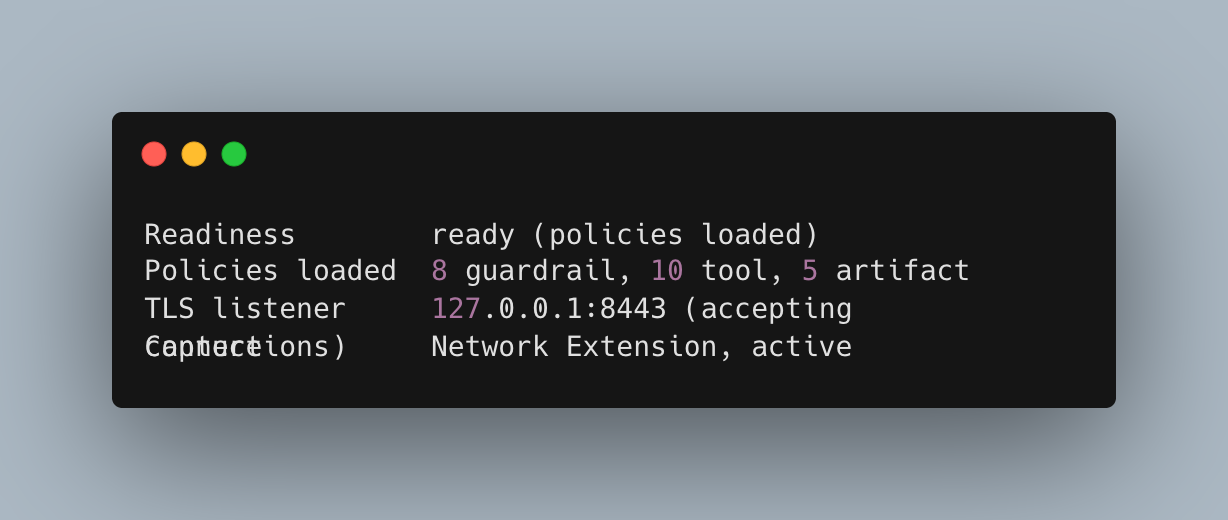
Look at the Capture line. If the Network Extension isn't active, Agent Guard isn't inspecting the traffic you're trying to test (and nothing below will work).
How Policy Gateway protects model-bound data
Agent Guard Policy Gateway sits between the AI client and the model provider. When you send a supported attachment such as an Excel spreadsheet, the gateway extracts the file content and checks it against the loaded guardrail policies before forwarding the request.
In this walkthrough, the shipped policy handles phone numbers, while the custom rule covers email addresses. Matching values are redacted before the request leaves the device, while the rest of the spreadsheet remains available for analysis.
Create the patient appointment spreadsheet
Create an Excel file named patient-appointments.xlsx. Use fictional records similar to these:
| patient_name | phone | medical_record_number | appointment_reason | |
|---|---|---|---|---|
| Ada Miller | ada.miller@example.com | 202-555-0101 | MRN-100184 | Annual checkup |
| Noah Smith | noah.smith@example.com | 202-555-0102 | MRN-100207 | Back pain |
| Maya Chen | maya.chen@example.com | 202-555-0103 | MRN-100233 | Cold symptoms |
| Liam Johnson | liam.johnson@example.com | 202-555-0104 | MRN-100251 | Blood pressure follow-up |
For a more realistic test, add date_of_birth, address, and diagnosis_code columns too (for example 1988-04-12, 18 Cedar Lane, Boston, MA, and Z00.00).
You can add more rows, but keep the same mix of useful clinical context and identifiers you expect the policy to handle.
Configure Agent Guard redaction
Add an email redaction policy
In our test, the shipped reference policy already included a Redact rule for personal phone numbers (confirm yours by watching the gateway logs during the test below). To protect the email addresses in the spreadsheet as well, add a custom GuardrailPolicy.
Create a new policy file:
nano ~/.agentguard/policies/global/jozu.ml_jozu_agentguard-reference-policy--v2/z2-email-redaction.yamlAdd the following:
apiVersion: gerty.jozu.dev/v1
kind: GuardrailPolicy

metadata:
  name: z2-email-redaction

spec:
  guardrails:
    - "*"

  direction: input

  action: Redact

  rules:
    - name: no-email-addresses
      assert: |
        !guardrail.findings.exists(f,
          (f.category == "body" ||
           f.category == "file" ||
           f.category == "json" ||
           f.category == "full_body") &&
          f.message.matches(
            "[A-Za-z0-9._%+-]+@[A-Za-z0-9.-]+[.][A-Za-z]{2,}"
          )
        )
      message: "Email address detected, masked before transmission."
The rule checks the content Agent Guard extracts from the request, including uploaded files. When it finds an email address, action: Redact masks the matching value before the request continues to the model.
Note: This drops the custom rule next to the reference policy for quick testing. Agent Guard manages that directory, so an update to the reference policy may replace it. Keep a copy of your rule, and for anything beyond a test, put it in its own source directory under
~/.agentguard/policies/global/or your organization's managed policy source.
Save the file, then restart Policy Gateway so it loads the new rule:
sudo agentguard gateway restartConfirm the policy is active by running this command:
agentguard gateway statusThe guardrail count should go up by one (8 to 9 in our test). The shipped policy covers phone numbers and your rule covers email addresses.
Test the redaction
With the phone and email protections in place, test the spreadsheet through your AI assistant or model client.
First, open a terminal and watch the Policy Gateway logs:
agentguard logs --gatewayThen start a new conversation in your AI assistant or model client. In this walkthrough, open the ChatGPT desktop app, upload patient-appointments.xlsx, and ask:
Read this spreadsheet. Summarize the appointment reasons, then tell me the patient names, dates of birth, email addresses, phone numbers, addresses, and medical record numbers that appear in it.
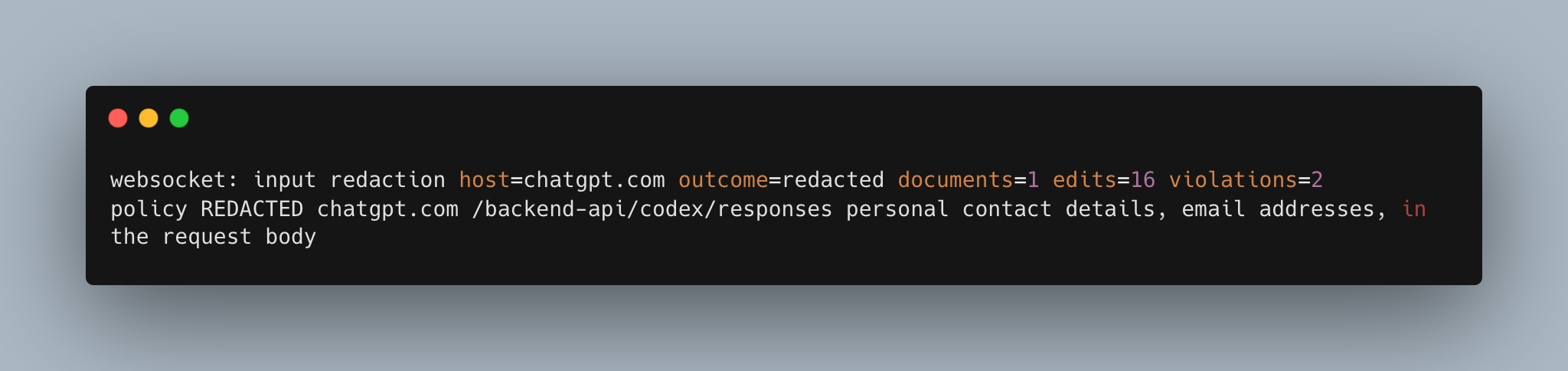
In our test run, ChatGPT still summarized all four appointment reasons, while every email address and phone number appeared as [redacted by Jozu].
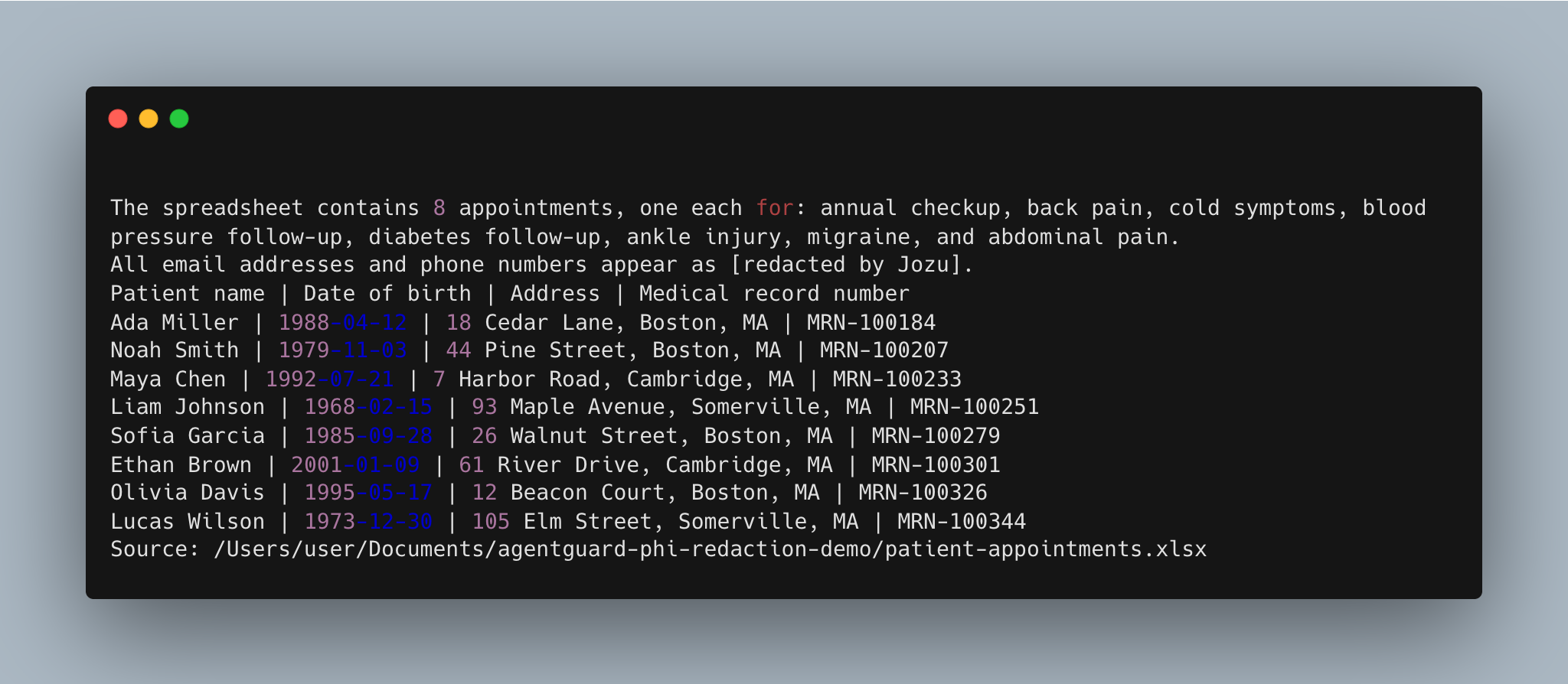
The gateway log confirmed the redaction:
From here you can extend the policy to cover other identifiers such as medical record numbers, dates of birth, patient IDs, or other organization-specific PHI and PII, then rerun the test to verify the new rules.
What to know about attachment redaction
Agent Guard treats extracted spreadsheet content as file findings, so attachment-aware rules should include the file category alongside the other request categories.
For Excel files, Redact can mask matching values and still allow the rest of the document through. PDFs and images are different. Agent Guard can't redact them in place, so a matching Redact rule may deny the request instead.
Unreadable or unsupported attachments may not produce a file finding at all. Always check the gateway logs to confirm the file was inspected and the values were actually redacted.
Best practices for protecting PHI and PII
- Keep each redaction rule specific to the identifier you want to protect.
- Test new rules with fictional data before using them in real workflows.
- Confirm
agentguard gateway statusshows the Network Extension as active. - Use
agentguard logs --gatewayto verify that redaction actually occurred (see Logs and audit). - Add rules for other identifiers, such as medical record numbers, dates of birth, or patient IDs, only when your workflow requires them.
- Re-test after every policy change to make sure useful data still reaches the model.
Wrapping up
The interesting part of this test isn't that the emails and phone numbers disappeared. It's that the rest of the spreadsheet didn't. ChatGPT still got the appointment reasons and diagnosis codes and still did useful work, it just never saw how to reach the patients.
That's the pattern for real PHI and PII workflows… let people keep using the AI tools they already like, and decide centrally which identifiers never leave the device.
Try Agent Guard free and run this test on your own Mac, or talk to us about rolling PHI and PII policies out across your fleet. For the details on GuardrailPolicy, redaction, and attachments, see the Agent Guard policy documentation.