

Introduction
You might already have Argo Workflows running smoothly and reliably. Your training pipelines are polished, the DAGs are tidy, and the CI/CD lights glow green. But what if someone says, "Cool—now do inference… at scale… with rollouts and rollbacks… audit trails… and can we avoid rebuilding Docker images for every tiny model change?"
This guide shows how to run inference inside the Argo setup you already have—without baking every new model version into a fresh container. The trick is to use KitOps ModelKits as immutable, versioned model bundles and let Jozu enforce policy integrity and auditability at runtime. Keep Argo doing what it does best, and let KitOps and Jozu pull a ModelKit, verify it, and run it—so your SREs sleep better and your data scientists ship faster.
In short:
- Argo handles orchestration.
- KitOps manages the packages.
- Jozu keeps everything honest.
You get repeatable, governed inference without rebuilding Docker images for every model bump.
Architecture Overview
Consider a practical scenario: we've developed a text classification model. Our goal is to seamlessly transition this model from a "trained artifact" to a "deployed inference service," and finally to "scalable inference jobs," providing a complete end-to-end view of the system.
Here's a high-level overview of how it works:
Model development → KitOps (package & build + push) → Jozu Hub (registry, validation, auto-inference container) → Argo Workflows (execution, DAG, scaling)
Below, we step through what each component does and how they tie together:
First, we'll train a text classification model. Below is a sample script that was used to train and test the text classification model for this example using scikit-learn.
import pickle
import numpy as np
from sklearn.feature_extraction.text import CountVectorizer
from sklearn.naive_bayes import MultinomialNB
from sklearn.pipeline import Pipeline

# Sample training data
positive_texts = [
    "I love this product, it's amazing!",
    "Great quality, would recommend to everyone",
    "Excellent value for money, exceeded expectations",
    "Very happy with my purchase",
    "Works perfectly, exactly what I needed"
]

negative_texts = [
    "This is terrible, worst purchase ever",
    "Poor customer service, very disappointed",
    "Product broke after one use",
    "Not worth the money, avoid this",
    "Doesn't work as advertised, waste of time"
]

# Prepare training data
X_train = positive_texts + negative_texts
y_train = [1] * len(positive_texts) + [0] * len(negative_texts)

# Create a simple pipeline with CountVectorizer and MultinomialNB
model = Pipeline([
    ('vectorizer', CountVectorizer()),
    ('classifier', MultinomialNB())
])

# Train the model
model.fit(X_train, y_train)

# Save the model
with open('model.pkl', 'wb') as f:
    pickle.dump(model, f)

print("Model trained and saved as model.pkl")

# Test the model
test_texts = [
    "I love this product",
    "This is terrible"
]

predictions = model.predict(test_texts)
probabilities = model.predict_proba(test_texts)

for i, text in enumerate(test_texts):
    sentiment = "positive" if predictions[i] == 1 else "negative"
    confidence = max(probabilities[i])
    print(f"Text: '{text}'")
    print(f"Prediction: {sentiment}")
    print(f"Confidence: {confidence:.2f}")
    print()
Store all the required files in one folder so it will be easy to track and trace files later if you need them for the project. Once you're done with training and saving the model, you can move ahead using KitOps to pack, build, and push the model to jozu.ml.
1. KitOps: Packaging, Build, and Push
After training your text classification model (along with any pre-processing code, tokenizer, config, etc.), you define a Kitfile that describes what goes into your ModelKit.
Here is a sample Kitfile content:
manifestVersion: 1.0.0
package:
  name: text-classification-model
  description: Simple text classification model for sentiment analysis using scikit-learn
  authors: [siddhesh-bangar]
model:
  name: model
  path: model.pkl
  parts:
    - path: model_info.json
    - path: requirements.txt
    - path: sample-inputs.json
code:
  - path: .
Running kit pack (or equivalent) bundles everything into a ModelKit, an immutable, self-contained artifact (code, weights, metadata, dependencies).
kit pack . -t jozu.ml/your-username/your-model-name:latestThen you push this ModelKit to a registry. In our setup, that's Jozu Hub, though KitOps is OCI-compatible so you could use other container registries too.
Note: Make sure you log in before you push your changes to Jozu Hub using kit login jozu.ml
kit push jozu.ml/your-username/your-model-name:latestThe beauty: once pushed, the model artifact is versioned, auditable, and traceable. You can sign it, verify integrity, and track lineage.
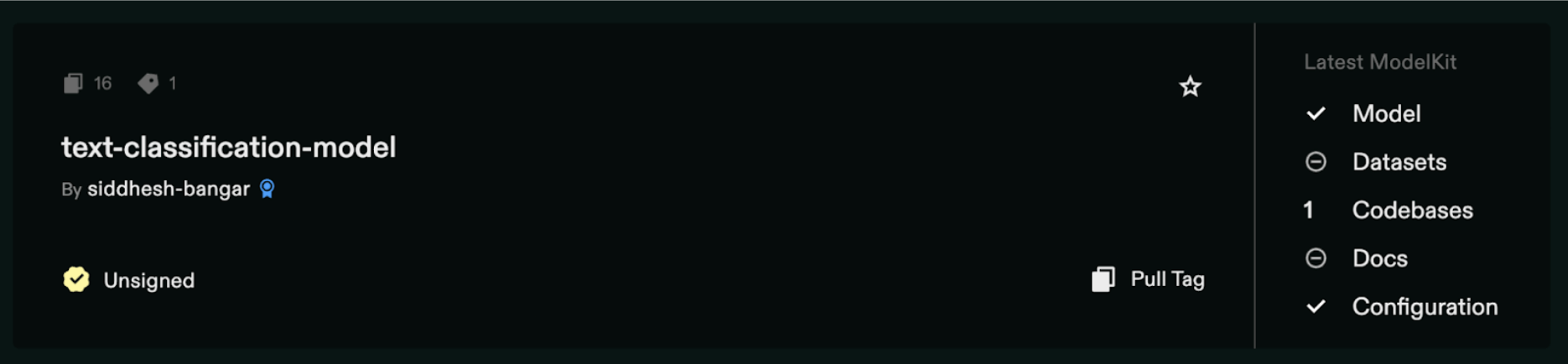
At the end of this step, you have a packaged, versioned model living in Jozu Hub.
2. Jozu Hub: Registry, Validation, and Auto-Inference Container
Jozu Hub isn't just another container registry—it adds governance, policies, and automation around ML artifacts. Some of its roles:
- Validation / Integrity Checks / Policies: When you push a ModelKit, Jozu can enforce checks (e.g., signature verification, metadata completeness, compliance rules).
- Audit Trail / Lineage / Logging: Every push, tag, or promotion is recorded. Track who did what, when, and what changed.
- Auto-Inference Container Generation: Based on the model artifact, Jozu can automatically generate or expose an inference container (or interface) so consumers don't have to manually build inference Docker images.
Jozu is the "smart" model registry that ensures trust, governance, and a clean handoff to inference.
3. Argo Workflows: Execution, DAGs, Scaling
Once your model is packaged and validated, Argo picks up the baton to run actual inference jobs.
Here's how:
Workflow Templates & Steps: You author Argo workflow YAMLs (or reuse templates) specifying steps like loading input, calling the inference container (from Jozu), and processing output/aggregating results.
First, create a namespace for Argo Workflows using kubectl create namespace argo
Make sure to install Argo Workflows as well: kubectl apply -n argo -f https://github.com/argoproj/argo-workflows/releases/download/v3.4.8/install.yaml

You can also set up port forwarding to Argo Workflows (optional): kubectl -n argo port-forward deployment/argo-server 2746:2746
Next, you need to set up a Docker registry secret for Jozu Hub using this command:
kubectl create secret docker-registry jozu-registry-cred \
  --docker-server=jozu.ml \
  --docker-username=<your-jozu-username> \
  --docker-password=<your-jozu-password> \
  --namespace=argo
After that, create a workspace service account that will be linked to the Docker registry secret, and then reference it in your workflow templates:
apiVersion: v1
kind: ServiceAccount
metadata:
  name: workflow-service-account
  namespace: argo
imagePullSecrets:
  - name: jozu-registry-cred
Single Inference Workflow
Next, create a workflow template file for single inference. These workflows can be triggered manually, via scripts, via webhooks, or on schedules.
apiVersion: argoproj.io/v1alpha1
kind: WorkflowTemplate
metadata:
  name: single-inference-template
  namespace: argo
spec:
  serviceAccountName: workflow-service-account
  entrypoint: inference-pipeline
  arguments:
    parameters:
    - name: input-text
      value: "I love this product"

  templates:
  - name: inference-pipeline
    steps:
    - - name: run-inference
        template: inference
        arguments:
          parameters:
          - name: input-text
            value: "{{workflow.parameters.input-text}}"

  - name: inference
    inputs:
      parameters:
      - name: input-text
    container:
      image: jozu.ml/your-username/your-model-name:latest
      command: ["/bin/sh", "-c"]
      args:
      - |
        echo "Running inference on text: {{inputs.parameters.input-text}}"
        curl -X POST http://localhost:8000/predict \
          -H "Content-Type: application/json" \
          -d '{"text": "{{inputs.parameters.input-text}}"}'
Apply this workflow template:
kubectl apply -f single-workflow-template.yamlNow, create a simple script to submit inference jobs:
cat > submit-workflow.sh << EOF
#!/bin/bash
TEXT="$1"
NAMESPACE="argo"
[ -z "$TEXT" ] && TEXT="I love this product"
cat > /tmp/inference-workflow.yaml << EOL
apiVersion: argoproj.io/v1alpha1
kind: Workflow
metadata:
generateName: single-inference-
namespace: $NAMESPACE
spec:
workflowTemplateRef:
name: single-inference-template
arguments:
parameters:
- name: input-text
value: "$TEXT"
EOL
kubectl create -f /tmp/inference-workflow.yaml
EOF
chmod +x submit-workflow.shRun your single inference:
./submit-workflow.sh "This product is amazing"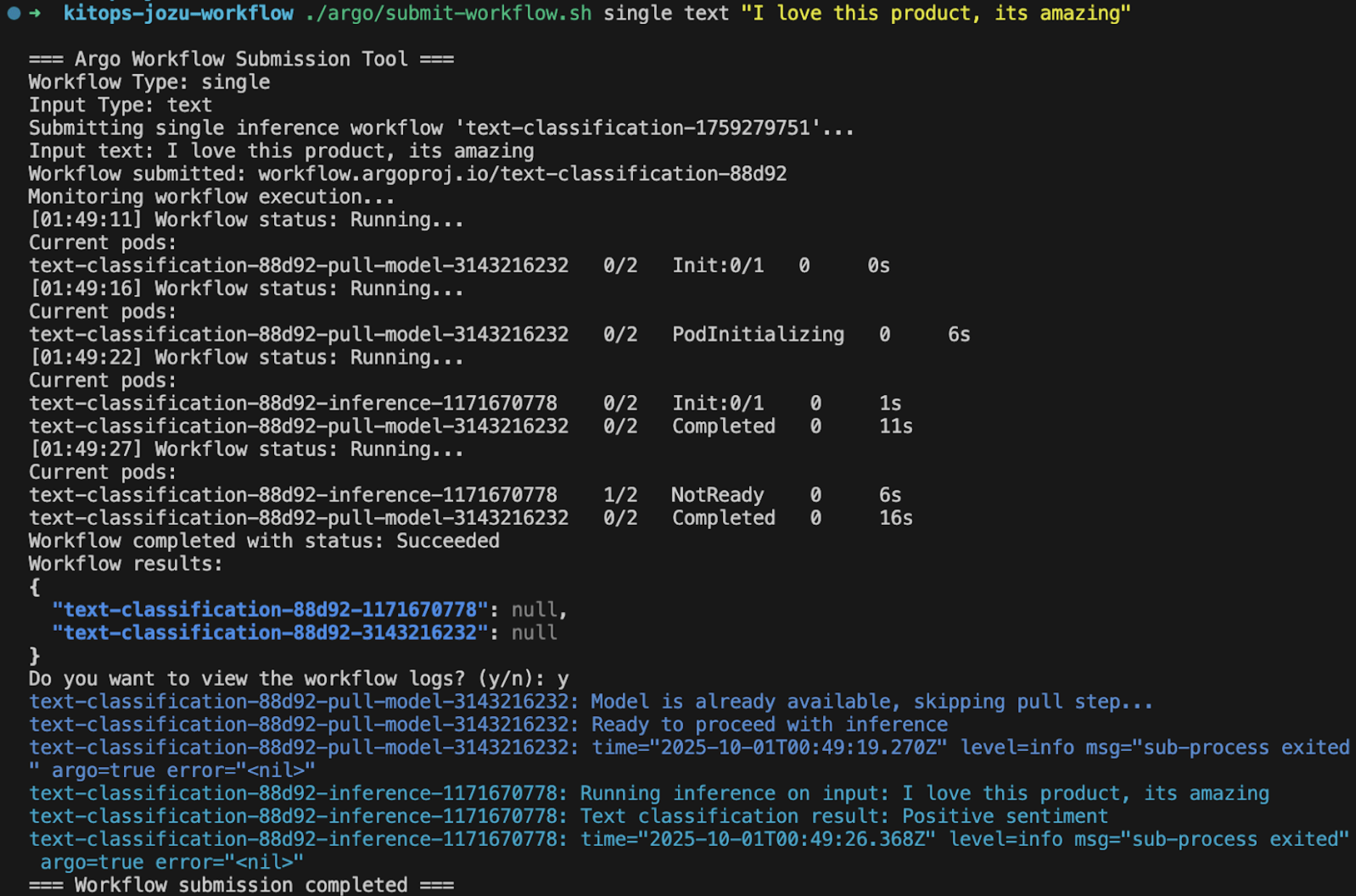

The result demonstrates:
- Pod Execution: Confirmation that the inference pod was successfully created and executed.
- Model Loading: Verification that the model was loaded from the specified ModelKit.
- Inference Output: The actual prediction result (positive/negative sentiment) along with the confidence score.
- Clean Exit: The pod completing successfully with exit code 0.
This simple single-inference workflow lays the foundation for more complex patterns.
Batch Inference Workflow
While single inference is useful for ad-hoc testing, production workloads often require processing hundreds or thousands of inputs in parallel. This is where batch inference shines. With Argo's DAG (Directed Acyclic Graph) capabilities, you can dynamically fan out multiple inference tasks based on an input list.
First, prepare your batch input data. Create a sample-inputs.json file:
{
  "inputs": [
    {"id": "1", "text": "I love this product"},
    {"id": "2", "text": "This is terrible"},
    {"id": "3", "text": "Great quality, would recommend"},
    {"id": "4", "text": "Poor customer service"},
    {"id": "5", "text": "Excellent value for money"}
  ]
}
Next, create a batch workflow template - full YAML configuration for batch processing with ConfigMap integration, DAG structure, and parallel inference task execution.
Apply this workflow template:
kubectl apply -f batch-workflow-template.yamlFinally, create a helper script to submit and monitor batch jobs that handles ConfigMap creation, workflow submission, and result aggregation.
Then run your batch inference:
./submit-batch-workflow.sh sample-inputs.json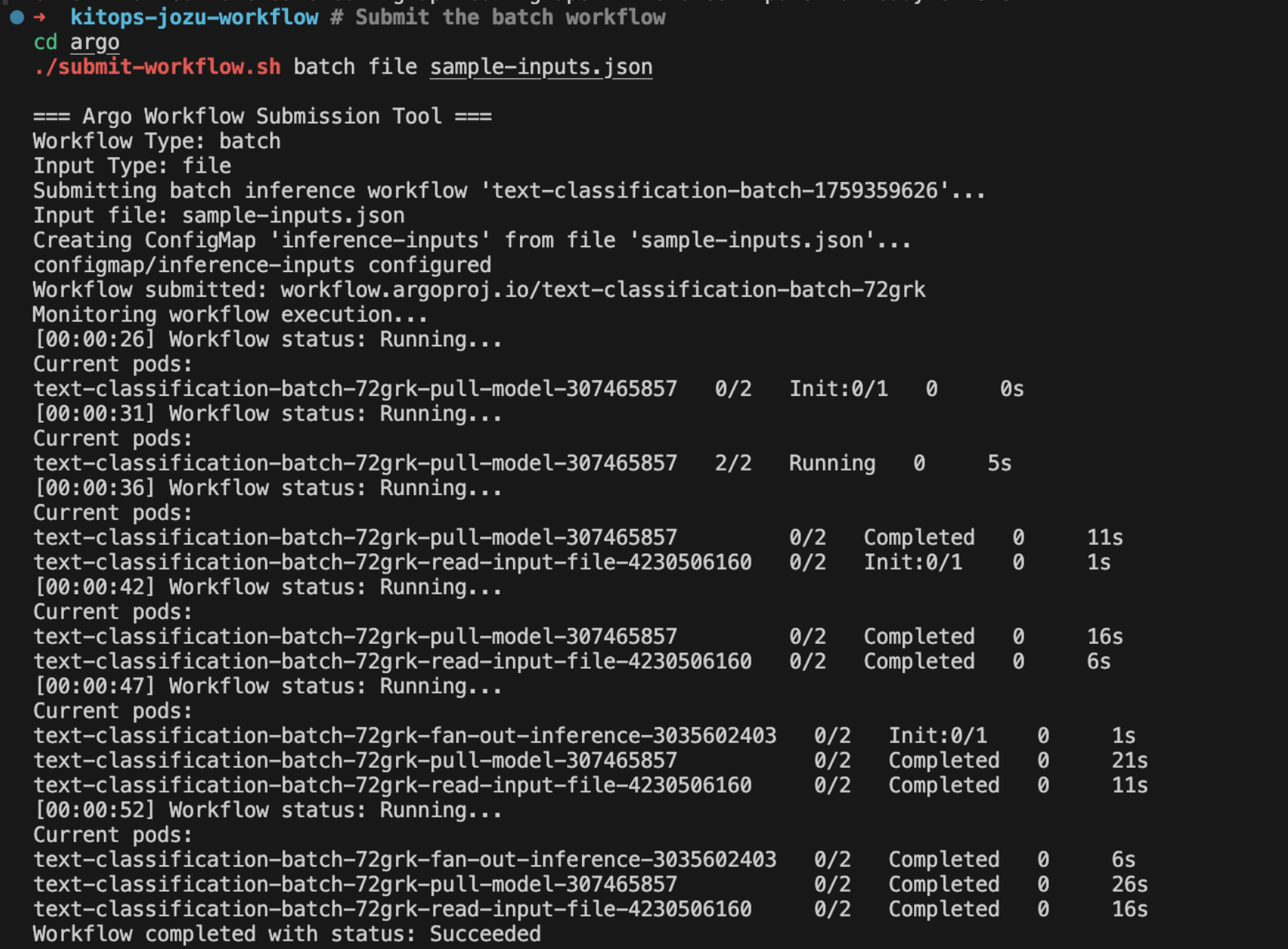
This comprehensive batch inference setup enables efficient processing of large datasets with clear visibility into each individual inference task. The ability to fan out tasks and process them in parallel is a core strength of Argo Workflows, ensuring that your ML models can handle real-world data volumes effectively.
The batch workflow execution showcases:
- DAG Visualization: A graphical representation of the workflow's Directed Acyclic Graph, illustrating the
read-inputsandprocess-inputstasks, with the latter fanning out into multiple parallelinference-IDtasks. - Task Statuses: Clear indicators demonstrating that all individual inference tasks have completed successfully.
- Logs and Outputs: The ability to drill down into specific tasks to view their logs and confirm the inference results for each processed input, reinforcing the auditable nature of the system.
This visual confirmation provides immediate feedback on the health and performance of your batch inference pipeline, allowing for quick identification and resolution of any potential issues.
Advanced Patterns
After establishing the fundamentals of executing single and batch inference, you can explore advanced patterns to enhance the power and production readiness of your workflows.
In certain scenarios, a single model may be insufficient. You may need to evaluate new model iterations against existing ones or route traffic to different models based on specific use cases.
Multi-Model Routing
- Argo enables the creation of branching workflows, where one branch directs input to Model A and another to Model B, allowing subsequent result comparison.
- This approach is valuable for A/B testing, ensemble methods, or implementing fallback strategies.
Scaling Inference with KitOps
KitOps streamlines the scaling process:
- Since models are packaged as containers, Kubernetes can provision the required number of replicas to manage demanding workloads.
- You can configure resource limits and requests to ensure that computationally intensive tasks receive adequate CPU/GPU power without compromising smaller jobs.
- Combined with Argo's parallelism, this enables concurrent processing of thousands of inputs across the cluster.
Reproducibility and Governance
A significant challenge in machine learning is the ability to re-execute a model at a later date and obtain identical results.
- KitOps addresses this through versioned ModelKits.
- Jozu Hub augments this with audit trails, signatures, and policies, ensuring models are trustworthy and verifiable.
- Argo records workflow executions, providing a comprehensive record of what input data was processed, which model versions were used, and what the corresponding outputs were.
This framework not only facilitates model deployment but also establishes accountability.
Fault Tolerance and Caching
Real-world systems are susceptible to failures, including pod crashes, resource exhaustion on nodes, and network instability.
- Argo enhances workflow resilience by enabling the configuration of retries, backoff strategies, and timeouts.
- Caching can be employed to prevent redundant re-execution of repetitive steps.
- These features collectively minimize wasted computational resources and significantly improve pipeline reliability.
Real-World Use Cases
This architectural setup transcends theoretical application, proving highly relevant across various industries:
- Medical: Execute batch inference on diagnostic images or patient notes, where reproducibility and audit trails are paramount.
- Finance: Fraud detection pipelines that require real-time processing of millions of transactions.
- Retail: Sentiment analysis of customer reviews or product recommendation engines that need to scale during peak shopping seasons.
Each of these domains benefits from the scalability offered by Kubernetes, the governance provided by Jozu, and the orchestration capabilities of Argo.
Conclusion
This guide has illustrated a robust, scalable, and governance-focused approach to deploying and managing ML inference workflows using a powerful trio: Argo Workflows for orchestration, KitOps for model packaging, and Jozu Hub for intelligent registry and policy enforcement. By combining their strengths, we've moved beyond the limitations of ad-hoc inference solutions to a system that delivers repeatability, auditability, and efficient scaling.
By adopting this framework, organizations can empower their data scientists to ship models faster and with greater confidence, while providing SREs with the tools to ensure robust, governed, and scalable inference operations. This convergence of orchestration, packaging, and governance truly elevates ML inference to a production-ready standard.